Peering/IXP
This is a technical workshop to teach the Interior Gateway Protocol (IGP) and Border Gateway Protocol (BGP) skills required for configuring interconnections between the autonomous networks that make up the Internet according to current industry best practices.
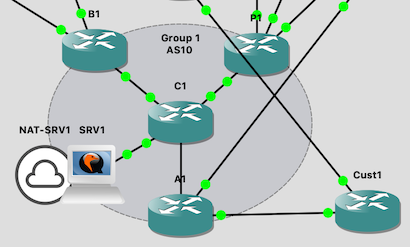
It runs with up to 8 groups. Each group has:
- A border router (BX)
- A peering router (PX)
- A core router (CX)
- An access router (AX)
- A customer router (CustX)
- A server (srvX)
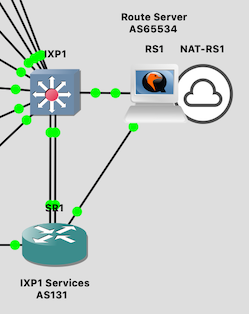
In addition, there are two "transit" routers which provide the uplinks; and two IXPs each with a switch (IXP), a services router (SR), and an Ubuntu BIRD router server (RS).
Files
You will need the following files:
| File | Description |
|---|---|
hosts-peering-ixp |
/etc/hosts file to go on the server |
peering-ixp-<version>.gns3project |
the GNS3 project |
vios-adventerprisek9-m.vmdk.SPA.157-3.M3 |
IOSv image |
vios_l2-adventerprisek9-m.SSA.high_iron_20180619.qcow2 |
IOSvL2 image |
nsrc-rs-<version>.qcow2 |
VM image with bird preinstalled, for RS and SRV instances |
peering-ixp-rs<N>-hdb-<version>.img |
cloud-init configs for RS |
peering-ixp-srv<N>-hdb-<version>.img |
cloud-init configs for SRV in each group |
The total memory allocation of all the devices is 27GB. There should still be enough RAM to run the NOC on a 32GB machine.
Backbone addressing plan
| IP Address | DNS Name |
|---|---|
| 100.64.0.2 | tr1.ws.nsrc.org |
| 100.64.0.3 | tr2.ws.nsrc.org |
| 100.64.0.5 | rs1.ws.nsrc.org |
| 100.64.0.6 | rs2.ws.nsrc.org |
| 100.64.0.10 | srv1.ws.nsrc.org |
| 100.64.0.20 | srv2.ws.nsrc.org |
| 100.64.0.30 | srv3.ws.nsrc.org |
| 100.64.0.40 | srv4.ws.nsrc.org |
| 100.64.0.50 | srv5.ws.nsrc.org |
| 100.64.0.60 | srv6.ws.nsrc.org |
| 100.64.0.70 | srv7.ws.nsrc.org |
| 100.64.0.80 | srv8.ws.nsrc.org |
See the training materials for the addressing plan used inside the network.
Credentials
These passwords are shared with the students:
| Device | Username | Password | Enable |
|---|---|---|---|
| Student routers | isplab |
lab-PW |
lab-EN |
| Student SRV | isplab |
lab-PW |
(In the initial state "00-blank", the student routers are unconfigured)
The instructor logins are not shared with the students:
| Device | Username | Password | Enable |
|---|---|---|---|
| TRx, SRx, IXPx | nsrc |
nsrc-PW |
nsrc-EN |
| RSx | nsrc |
nsrc-PW |
The isplab / lab-PW login also works on these devices, so that students
can inspect the state of the infrastructure, e.g. show BGP status, although
they will not know the enable password.
On the route servers, the isplab account is not able to sudo - but it is
in group bird so they can read bird.conf and interact using birdc.
Snapshots
There are pre-generated snapshots for many different stages of the lab.
Normally this class starts with the routers and switches completely unconfigured. You can reset to this state using the "00-base" snapshot (note that the transit and IXP routers are configured in this snapshot). The uplinks from the IXP services router (SR) are shut down, so that the IXP services subnets do not appear in the initial BGP routing table.
You can restore to any given snapshot using Edit > Manage Snapshots in the
GNS3 client. Beware that when you restore from a snapshot it will reset
all of the devices - including the Linux servers - and you will also lose
any changes you've made to the network topology itself.
Use the gns3man tool if you want to restore the configuration of an
individual device.