Leave project running
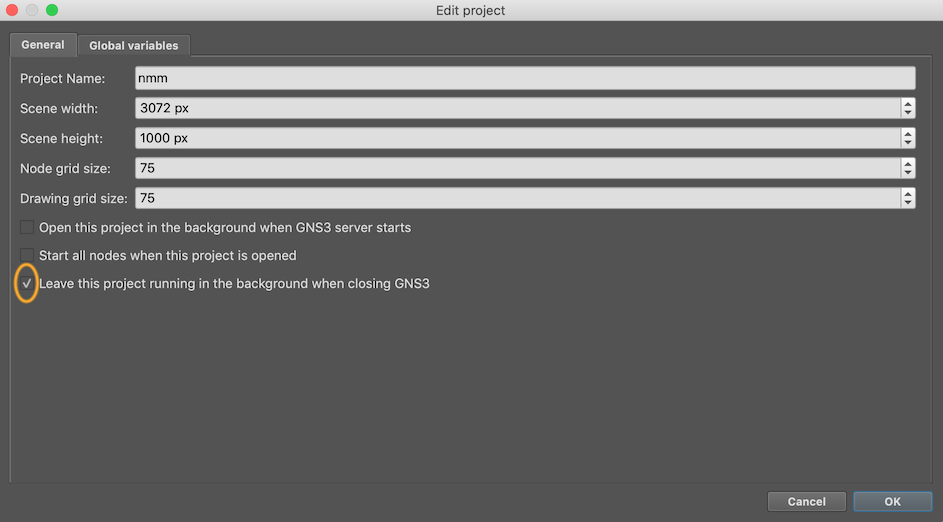
If for some reason you exit the GNS3 client or it crashes, you do not want
the classroom virtual network to be terminated. Under File > Edit Project
ensure that "Leave this project running in the background when closing"
is checked. Do this for each topology you use (CNDO, NMM)
Warning
If you restore the entire project from a snapshot - using Edit > Manage
Snapshots - then this flag is reset. Remember to set it again
afterwards.
For the NOC, you can check all three boxes so your NOC VM auto-starts as soon as the server boots.
Locked objects
Devices are "locked" in position, so you can't accidentally move them around or delete them. Should you wish to do so, then right-click and "Unlock Item"
Configuration management web page
The GNS3 GUI currently does not have a way to restore individual devices from snapshot, or export/import devices of individual IOSv devices (e.g. for password recovery)
Until those features are added, we have written a small CGI tool to perform
those functions. It's important that the CGI runs as the nsrc user, in
order to have permissions to change the disk image files, so a little work
is required to make this happen.
First, install the necessary packages:
sudo apt-get install python3-guestfs apache2 apache2-suexec-pristine unzip
sudo a2enmod cgi suexec userdir
sudo chmod +r /boot/vmlinuz-*
Create /etc/apache2/conf-enabled/usercgi.conf containing:
<Directory "/home/*/public_html/cgi-bin/">
    Options ExecCGI
    SetHandler cgi-script
</Directory>
Restart apache:
sudo systemctl restart apache2
As the nsrc user, make the directory and install the script:
mkdir -p ~/public_html/cgi-bin
cd ~/public_html/cgi-bin
wget https://raw.githubusercontent.com/nsrc-org/nsrc-gns3/main/gns3man
chmod 755 ~/public_html/cgi-bin ~/public_html/cgi-bin/gns3man
Note
suexec is fussy about permissions, and will not allow scripts to
execute if the group-write bit is set on the script or its enclosing
directory.
The CGI should now be available at http://100.64.0.1/~nsrc/cgi-bin/gns3man
Warning
Whenever you update the kernel, you will need to re-run the command:
sudo chmod +r /boot/vmlinuz-*
This is because the CGI uses libguestfs to read and write the IOSv NVRAM, and this in turn needs to read your kernel to start a temporary virtual machine. If it cannot read the kernel, it will generate this error:
libguestfs: error: /usr/bin/supermin exited with error status 1.