You will need to give students a way to access the consoles on their virtual routers and switches.
GNS3 provides this by means of telnet on different ports. It works well, even allowing multiple sessions to connect to the same port. Unfortunately, the port numbers are dynamic, and change each time you start the topology.
The solutions for this are under development and likely to change.
shellinabox
"shellinabox" allows terminal sessions to take place inside a web browser. Install the package:
sudo apt-get install shellinabox
We have written a front-end which dynamically queries the GNS3 API for the ports. Download it and install it:
wget https://raw.githubusercontent.com/nsrc-org/nsrc-gns3/main/gns3-shellinabox.py
chmod +x gns3-shellinabox.py
sudo mv gns3-shellinabox.py /usr/local/bin/gns3-shellinabox.py
Add the shellinabox user to the "nsrc" group so it can read the GNS3 API password from the GNS3 config file:
usermod -a -G nsrc shellinabox
Edit /etc/default/shellinabox and change the SHELLINABOX_ARGS setting:
SHELLINABOX_ARGS="--no-beep -t -s /:shellinabox:shellinabox:/var/tmp:/usr/local/bin/gns3-shellinabox.py"
Finally, start shellinabox:
sudo systemctl start shellinabox
sudo systemctl enable shellinabox
Point your web browser at http://100.64.0.1:4200/ to test. If the emulator is running, it should show clickable URLs for each of the console ports.
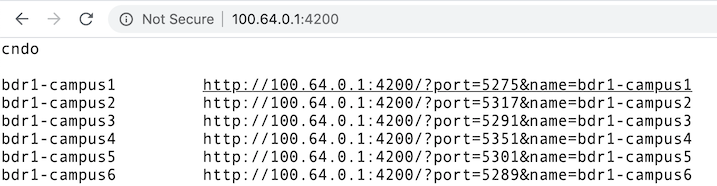
Click on one to connect, then hit Enter to wake up the serial port.
Protecting shellinabox
shellinabox doesn't have a configuration setting to bind to the internal
interface. Therefore, it will be open and accessible over the Internet if
you have a public IP address on your WAN interface, and you may wish to
firewall it off (e.g. with iptables or ufw).